Compass can turn a curriculum PDF into a sequence of HomeTrail planner entries. It creates references and scheduling details; it does not reproduce or replace the curriculum.
Planner import is included with HomeTrail Plus. On the website, open Plus Hub → Compass and find Create planner entries from an authorized curriculum PDF.
Import a syllabus or a curriculum that is too long
For a syllabus describing future lessons, use curriculum planner import, not completed-learning report import. The PDF needs readable lesson content; a table of contents or a short outline alone may not contain enough detail to make entries.
The current curriculum limit is 600 pages per upload and 250 MB. If a large PDF (for example, 535 pages) reports too many pages, compare it with this current limit. If it is already within the limit, retry once and contact support with the exact error if it still fails; the page count alone does not explain the failure. If it exceeds the current limit, prepare a shorter portion. Compression reduces bytes, not pages. Keep your original intact and export a shorter, readable-text PDF containing the complete lesson pages for the portion you want to plan, within both limits. Review page references against the uploaded portion and original before adding the plan. If you import another portion later, review its dates and lessons separately to avoid duplicates; separate imports are not automatically merged into one course sequence.
If you cannot prepare a shorter authorized copy, use Contact support and describe the page count and error. Do not bypass document protection or upload a lesson list without the actual lesson pages.
Create the draft
You can also start from Home → Your family rhythm while adding or editing an activity:
- Enter the activity details and choose Save & add PDF, or Save changes & add PDF for an existing item, under Curriculum PDF. This saves the activity and opens the upload inside the same editor.
- Choose the PDF and confirm your permission to use it for planning.
- Select Start reading. You can keep working or close the editor and use the progress update in the corner to return.
- Review the lessons, then select Add this plan. The original PDF and lesson plan stay together with the activity.
To start from Plus Hub → Compass instead:
- Select a PDF up to 250 MB — a full course book fits without compressing it.
- Enter a curriculum name when the title is not clear from the file.
- Choose the students who will use it.
- Set the first date, normal session duration, and days of the week.
- Confirm that you own the material, it is public or OER, or your license or school permits this planning use.
- Choose Create planner entries.
Compass can review readable-text PDFs up to 600 pages. For a long curriculum, it works through the document in sections and combines the lessons into one draft, including lessons found near the end. Image-only scanned PDFs are not supported yet.
If no planner entries are found
If the import fails with "No planner entries were found in this PDF," the file usually doesn't contain the lesson pages Compass looks for. To fix it:
- Include the actual lesson pages. Compass finds lessons where their content begins in the document — a table of contents or lesson list on its own is not enough. If you trimmed the PDF, make sure the lessons themselves made the cut.
- Upload the whole document. Compass reads the text of your PDF, not the pictures, and handles files up to 250 MB and 600 pages — there is usually no need to trim or compress a course book. If your file is larger than 250 MB, use your PDF tool's compress or reduce-file-size option rather than deleting pages.
- Avoid image-only scans. A scanned PDF without selectable text has nothing for Compass to read. If you can select and copy text in your PDF viewer, the file will work; if not, export a text version from the original source if one is available.
Review before adding
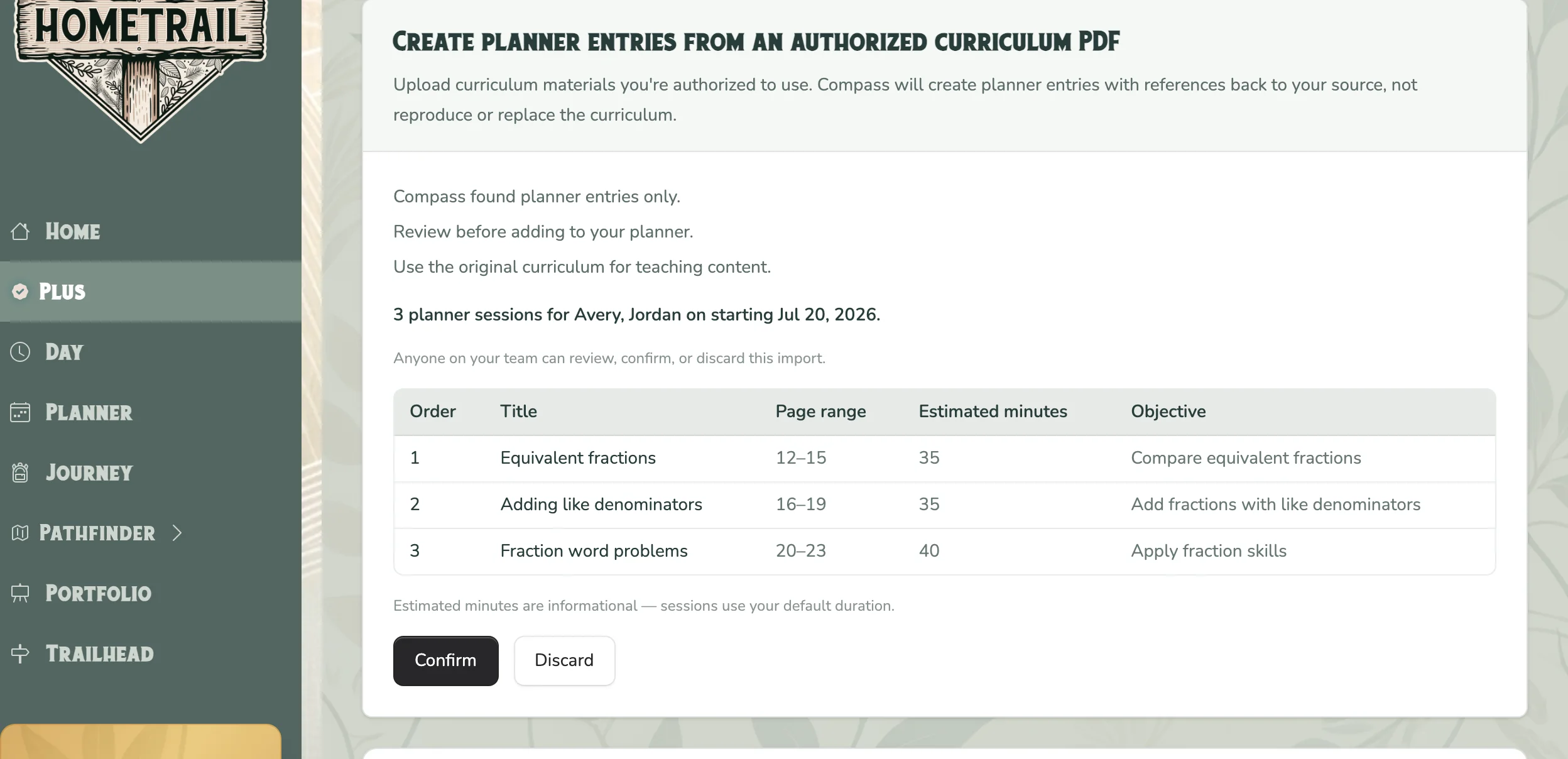
Compass shows the sequence it found, including titles, source page ranges, estimated minutes, and objectives. Estimated minutes are informational; created sessions use the default duration selected in the form. Check the order and references against the original curriculum.
Any team member can choose Confirm to create the Rhythm item and Planner Sessions, or Discard to remove the draft. Continue using the original curriculum for teaching content.
Use the imported plan
In the Planner's Week and Month views, imported entries show the lesson title, objective, source filename, and page range. These are planning references to your original curriculum.
- Select an imported entry to open Edit activity. Add notes and record completion as you would for another activity.
- Choose View source PDF on the entry to open the saved original in a separate tab, when the PDF is available.
- Use the page range to find the lesson in your original curriculum.
Planning references do not open the Learn player. Lessons with teaching activities or lesson PDF or audio materials can still open in Learn. Existing imports use this behavior without uploading the PDF again.
Remove a confirmed import
If you confirmed an import while trying it out or need to choose a different schedule, you can remove the plan Compass added:
- Return to Plus Hub → Compass.
- Under Recently added from Compass, choose Remove imported plan.
- Review the confirmation. HomeTrail shows whether the plan contains completed sessions, uploaded files, or portfolio entries.
- Choose Remove imported plan again to confirm.
This permanently deletes every Planner Session created by that PDF import and removes its Rhythm assignment. Completed Session records, uploaded files, and portfolio entries attached to those Sessions are also removed. The Rhythm item remains available, so you can schedule it again when you are ready.
Adjust after a missed lesson
If a lesson is missed later, tell TrailGuide which lesson was missed and when you want to resume. For example:
“We missed Fractions Tuesday; resume Thursday and reflow the rest.”
TrailGuide will show the proposed change and ask you to confirm it. After confirmation, TrailGuide moves the missed, incomplete lesson to the requested resume date and reflows every later incomplete lesson in that sequence. Later lessons continue on the curriculum weekdays you selected during import.
Completed lessons stay on their original dates, and existing planner notes are preserved. This sequence reflow is available only for planner entries created from a Compass curriculum PDF import.
Start partway through or spend more days on each week
Open Home → Your family rhythm, select the curriculum, and find Adjust lesson plan. Describe the change, then select Ask TrailGuide. For example:
“Start at Week 21 next Monday. Spend five learning days on each curriculum week, Monday through Friday, 30 minutes a day.”
- Tell TrailGuide where you want to start, when to begin, and how many learning days to spend on each lesson or week. If you are unsure where to start, ask it to continue where you left off.
- TrailGuide checks the existing lessons and progress. If it finds completed work or logged time, it asks whether those days should count toward the new pace or whether you want fresh practice. If unfinished days have saved work, it asks whether to keep their dates or move that work with the plan.
- Type your answer in the same box and select Send reply. You can answer follow-up questions or correct details without repeating your original request.
- Review the starting lesson, date, weekdays, pace, and saved-work choices, then select Apply lesson plan.
You can also ask TrailGuide by SMS or WhatsApp to make the same change and confirm its proposal.
Each lesson or curriculum week stays available on the chosen number of learning days. This schedules repeated work on the same content; it does not automatically divide the PDF into daily pages. Daily minutes control the planned time on each of those days.
Earlier empty plans leave the calendar without being marked complete or deleted. Completed learning stays saved on its original dates. Saved work before the starting lesson, and any surplus saved days, keep their original dates. Moving unfinished work keeps its notes and materials together. If activity changes after the review, TrailGuide asks you to review again before applying. The requested start date advances to the next available learning day when necessary.
This requires HomeTrail Plus and an activity with a curriculum lesson sequence. For an activity without a sequence, add its curriculum PDF first.

